

A Spiderman PFP gives your social media profile a superhero look with bold colors, web designs, mask close-ups, and memorable poses. Fans of Marvel can use a Spider-Man profile picture on Instagram, TikTok, Discord, WhatsApp, YouTube, and gaming accounts.
Spider-Man offers plenty of styles, from the classic red-and-blue suit to the black suit, animated artwork, and Miles Morales designs. You can pick a picture that matches your personality, favorite version of the hero, or preferred online aesthetic.
What Is a Spiderman PFP?
A Spiderman PFP is a profile picture featuring Spider-Man, the Marvel superhero created by Stan Lee and Steve Ditko. Peter Parker serves as the original Spider-Man in Marvel Comics, while Miles Morales also carries the mantle in comics, films, and games.
The abbreviation PFP means “profile picture.” Fans use these images to personalize their online accounts and show their interest in Spider-Man.
Here are some popular styles:
- Classic Spiderman PFP: Red-and-blue suit with the familiar web pattern.
- Black Suit Spiderman PFP: Dark costume with a bold, mysterious appearance.
- Miles Morales PFP: Black-and-red suit inspired by the younger Spider-Man.
- Anime-style Spiderman PFP: Colorful fan art with expressive details.
- Cute Spiderman PFP: Friendly poses, playful expressions, and cartoon artwork.
- Dark Spiderman PFP: Shadows, black backgrounds, and dramatic lighting.
- Funny Spiderman PFP: Memes, humorous poses, and playful edits.
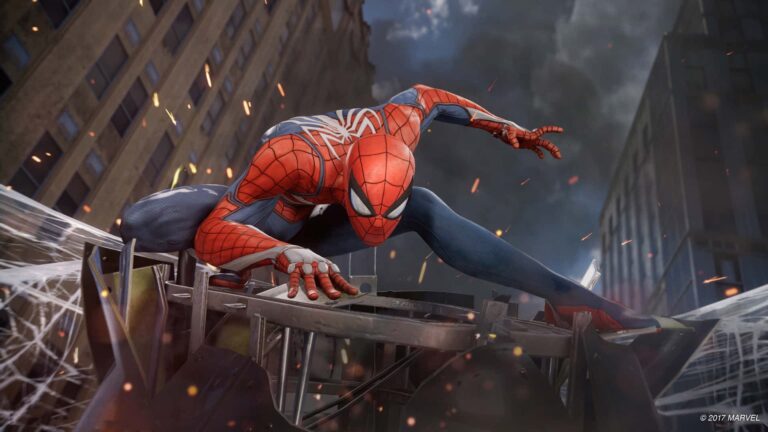
Best Spiderman PFP Styles for Your Profile
The right Spider-Man avatar depends on the mood you want for your account. Some fans prefer comic-book artwork, while others choose cinematic shots or colorful animated designs.
| PFP style | Visual appearance | Best platform |
|---|---|---|
| Classic Spider-Man | Red-and-blue mask | |
| Black Suit Spider-Man | Dark suit and white eyes | Discord |
| Miles Morales | Black-and-red costume | TikTok |
| Tom Holland Spider-Man | Movie-inspired portrait | |
| Tobey Maguire Spider-Man | Classic movie-era look | |
| Andrew Garfield Spider-Man | Detailed mask and expressive eyes | YouTube |
| Spider-Man Noir | Black-and-white artwork | Gaming accounts |
| Cute Spider-Man | Cartoon face or playful pose | |
| Spider-Man Meme | Funny expressions and edits | Discord |
| Spider-Verse Spider-Man | Colorful animated artwork |
Classic Spiderman PFP
The classic Spider-Man profile picture features the familiar red-and-blue costume, web patterns, and large white eye lenses. This style works for fans who prefer the traditional comic-book appearance.
Popular design ideas:
- A close-up of Spider-Man’s mask.
- Spider-Man hanging upside down.
- A rooftop pose against a city skyline.
- A comic panel with bold outlines.
- A red-and-blue portrait against a dark background.
A centered mask portrait works particularly well in small circular profile icons because the main details remain easy to see.
Black Suit Spiderman PFP
A black suit Spiderman PFP offers a darker appearance than the classic costume. The black fabric, white spider emblem, and sharp eye lenses create a strong visual contrast.
Try these design styles:
- Black suit with a shadowy background.
- Venom-inspired Spider-Man artwork.
- Close-up mask with bright white lenses.
- Black-and-white comic illustration.
- Dark red lighting against a black backdrop.
This style suits Discord profiles, gaming accounts, and social media pages with a dark aesthetic.
Miles Morales Spiderman PFP
Miles Morales brings a different look to Spider-Man artwork through his black-and-red suit and distinctive visual style. His animated appearances in Spider-Man: Into the Spider-Verse and Spider-Man: Across the Spider-Verse offer plenty of inspiration for profile pictures.
Popular Miles Morales PFP ideas:
- Red accents against a black mask.
- A neon-lit Brooklyn backdrop.
- Graffiti-inspired artwork.
- A close-up portrait in an animated style.
- Miles in a hoodie or casual clothing.
- A black-and-red gaming avatar.
For a modern profile, choose an image with a clear face and limited background detail.
Movie-Inspired Spiderman PFP
Movie-inspired profile pictures appeal to fans who prefer live-action versions of the hero. Peter Parker’s portrayal differs across the films, giving fans several visual styles to choose from.
| Version | Popular PFP idea | Overall look |
|---|---|---|
| Tobey Maguire | Classic red-and-blue mask | Nostalgic |
| Andrew Garfield | Detailed suit close-up | Sleek |
| Tom Holland | Masked portrait or action pose | Modern |
| Animated Spider-Man | Colorful comic-style frame | Artistic |
| Miles Morales | Black-and-red mask | Urban |
For the cleanest result, crop the image around the mask or upper body rather than keeping too much of the original movie scene.
Cute Spiderman PFP
A cute Spider-Man PFP brings a playful mood to your account. This style works well for fans who prefer friendly artwork over intense action poses.
Ideas worth trying:
- Chibi Spider-Man with a large head and small body.
- Spider-Man waving at the viewer.
- A tiny Spider-Man sitting on a web.
- Cartoon Spider-Man holding a heart.
- A simplified mask with rounded eyes.
- Spider-Man in a pastel-colored design.
Pink, sky blue, lavender, and soft red backgrounds can give the avatar a gentle appearance. A simple illustration also remains clear at small sizes.
Dark Spiderman PFP
Dark Spider-Man profile pictures use deep shadows, dramatic lighting, and strong contrasts. The costume may appear against a rainy street, a nighttime skyline, or a plain black backdrop.
Try a design featuring:
- A half-lit Spider-Man mask.
- Red lighting around the eye lenses.
- Rain falling across a city rooftop.
- A black suit with subtle highlights.
- A close-up portrait with a grainy comic effect.
Keep the face or mask near the center so the circular crop does not hide the main details.
Funny Spiderman PFP
A funny Spider-Man PFP suits users who enjoy memes, playful edits, and humorous online conversations.
Some popular concepts are:
- Spider-Man pointing at another Spider-Man.
- A confused or surprised mask expression.
- Spider-Man looking exhausted.
- A silly cartoon pose.
- A reaction image from a Spider-Man film.
- A deliberately awkward edit for a gaming profile.
Meme images work best with a clear expression and a simple crop. Large text may become unreadable in a small profile icon, so keep captions short or remove them.
Best Spiderman PFP Ideas for Different Platforms
Each platform displays profile pictures a little differently. A square image with a centered subject usually works across most social apps.
| Platform | Recommended design | Useful tip |
|---|---|---|
| Mask close-up | Keep the face centered | |
| TikTok | Bright Miles Morales portrait | Use strong contrast |
| Discord | Dark suit Spider-Man | Avoid busy backgrounds |
| Friendly movie portrait | Choose a clear crop | |
| YouTube | Comic-style Spider-Man | Use a sharp, high-resolution image |
| Classic Spider-Man mask | Keep the full mask visible | |
| Gaming profiles | Black suit or neon artwork | Use bold shapes |
| Cute or artistic Spider-Man | Pick a distinctive design |
How to Choose a High-Quality Spiderman PFP
A good profile picture needs more than an appealing character design. Image quality, framing, and contrast also affect its appearance across different screens.
Use these tips before saving your avatar:
- Check the resolution: Start with a sharp image rather than a blurry screenshot.
- Choose a square crop: A 1:1 aspect ratio works for most profile-picture layouts.
- Keep the subject centered: Circular crops may remove the corners of a square image.
- Check the lighting: Bright eye lenses and clear costume details help the image remain visible.
- Avoid excessive text: Small lettering can disappear on mobile screens.
- Match your theme: Choose colors that fit the rest of your profile.
- Save the original quality: Avoid repeated screenshots that reduce image sharpness.
A 512 × 512 pixel image provides a useful starting point for many online avatars, though each platform may have its own upload requirements.
Where to Find Spiderman PFP Images
You can look for Spider-Man profile pictures through several types of sources:
- Official Marvel pages: Visit the Marvel website for character information and official promotional material.
- Movie galleries: Check official Sony Pictures movie pages for Spider-Man promotional images.
- Fan-art platforms: Browse artwork posted by artists who permit personal profile-picture use.
- Wallpaper websites: Search for square Spider-Man portraits or crop a suitable wallpaper.
- Image editing apps: Create a custom avatar using a permitted image, a colored background, and simple effects.
Before using fan art, check the artist’s permission and usage rules. Giving credit does not automatically grant permission to reuse an image.
How to Make Your Own Spiderman PFP
Creating a custom avatar can help your profile feel more personal.
- Pick your preferred Spider-Man version, such as Peter Parker or Miles Morales.
- Choose a suitable image or artwork that you have permission to use.
- Crop the image into a square.
- Move the mask or face toward the center.
- Adjust brightness, contrast, and sharpness.
- Add a subtle border or background color, provided it does not hide the character.
- Export the final image in PNG or JPG format.
- Upload it to your preferred social platform and check the circular preview.
For a simple design, use a close-up portrait, a plain background, and one accent color. This approach keeps the avatar clean and easy to identify.
Common Mistakes to Avoid With a Spiderman PFP
A great design can lose its appeal through poor cropping or low image quality. Avoid these common problems:
- Using a stretched or pixelated image.
- Cropping off the mask or eye lenses.
- Selecting a busy background with too many details.
- Adding too many stickers, filters, or text effects.
- Using artwork without checking its usage terms.
- Saving an image with excessive compression.
Always preview the final image at a small size before uploading it.
Final Thoughts
A Spiderman PFP offers plenty of ways to personalize an online profile. Classic red-and-blue artwork suits traditional fans, Miles Morales adds a colorful animated style, and black suit designs create a darker mood. Cute illustrations and funny edits provide more playful alternatives.
Pick an image that matches your style, check its quality at a small size, and use artwork you have permission to share. A clear, well-cropped Spider-Man avatar can give your profile a distinctive superhero look.
What does Spiderman PFP mean?
Spiderman PFP means a Spider-Man profile picture. Users place it on social media, messaging apps, gaming platforms, and other online accounts.
Which Spiderman PFP style looks best?
A classic mask close-up works for a traditional superhero look. Miles Morales suits a modern animated aesthetic, while the black suit offers a darker style.
Can I use a Spiderman PFP on Discord?
Yes. You can upload a suitable Spider-Man image as your Discord avatar, subject to the platform’s rules and the image’s usage permissions.
What size works best for a Spiderman PFP?
A square image at 512 × 512 pixels is a practical starting point. Check the upload requirements of your chosen platform for its preferred dimensions and file size.
Can I use Spider-Man fan art as my profile picture?
You can use fan art if the artist permits that use. Check the original creator’s terms before saving or uploading their work.
How do I make my Spiderman PFP look sharper?
Start with a high-resolution source, avoid excessive compression, keep the face centered, and use moderate sharpening rather than heavy filters.