
Ghostface profile pictures work especially well on TikTok, Discord, Instagram, Snapchat, and gaming platforms. Some users prefer the original horror appearance, while others choose pink backgrounds, anime-inspired artwork, matching couple pictures, or funny Ghostface edits.
The character’s distinctive mask also makes Ghostface PFP designs easy to identify, even inside a small circular profile frame.
What Is a Ghostface PFP?
A Ghostface PFP is a profile picture featuring the masked killer from the Scream movie franchise or an artistic variation of the character’s appearance. PFP means “profile picture,” a term widely used across social media and gaming communities.
The Ghost Face mask existed before the first Scream movie arrived in 1996. Fun World produced the mask, and the filmmakers used its distinctive appearance for the masked killer. The costume features an elongated white face, dark eye openings, and a black hooded robe.
Modern Ghostface PFP designs extend beyond screenshots from the movies. Digital artists create cartoon versions, neon illustrations, romantic matching avatars, and minimalist black-and-white portraits.
| Feature | Details |
|---|---|
| PFP meaning | Profile picture |
| Character | Ghostface |
| Movie franchise | Scream |
| First Scream movie | 1996 |
| Original mask manufacturer | Fun World |
| Popular colors | Black, white, red, pink, purple |
| Popular platforms | TikTok, Discord, Instagram, Snapchat |
| Common styles | Scary, cute, anime, aesthetic, matching |
| Common image formats | PNG, JPG, WebP |
Best Ghostface PFP Ideas for Social Media
Ghostface avatars offer plenty of creative options. A classic black-and-white image suits a horror-themed account, while colorful illustrations create a softer appearance.
A white Ghostface mask against a black background creates a dramatic horror avatar. Dark shadows around the hood give the image a cinematic appearance. This design works especially well for Discord and gaming profiles.
A pink Ghostface PFP combines the eerie mask with pastel shades, hearts, bows, and soft backgrounds. It offers a cute horror aesthetic for TikTok, Instagram, and matching avatars.
Anime-style Ghostface artwork features expressive poses, vibrant colors, and illustrated backgrounds. Purple lighting, glowing outlines, and manga-inspired details add personality to the familiar mask.
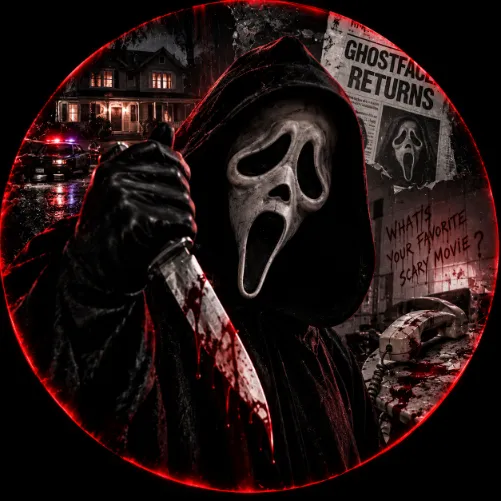
Red lighting against the white mask creates a bold horror look. A dark background keeps the mask visible and makes this style suitable for gaming avatars and Halloween profiles.
Matching Ghostface PFP for Couples and Friends
Matching Ghostface PFP designs allow two friends or partners to coordinate their online appearance. These images usually share the same colors, illustration style, or background.
Popular matching designs feature:
-
Two Ghostface characters facing each other.
-
Pink and black Ghostface avatars with matching hearts.
-
Ghostface and another horror character in coordinated frames.
-
Split images that form one larger picture.
-
Cartoon Ghostface characters wearing matching accessories.
-
Matching red and purple backgrounds with similar lighting.
For the best result, both images should use identical dimensions and a consistent visual theme. Separate square images work better than cropping two avatars from a single narrow picture.
Cute Ghostface PFP With a Soft Aesthetic
A cute Ghostface PFP gives the frightening mask a playful appearance. Artists use pastel backgrounds, oversized hoodies, tiny hearts, and cartoon proportions to create a friendlier design.
Popular decorative elements are:
-
Pink hearts and small stars.
-
Lavender or baby-blue backgrounds.
-
Cartoon Ghostface holding a flower.
-
White outlines and soft glowing effects.
-
Cute expressions created through body poses.
-
Tiny bats, pumpkins, and Halloween decorations.
These designs suit users who enjoy horror visuals without making their profile appear too dark or aggressive.
Black and White Ghostface PFP
A black and white Ghostface PFP keeps the design close to the character’s original appearance. The contrast between the pale mask and dark costume creates a clean avatar without extra decoration.
A close-up portrait works particularly well because the mask remains visible after a platform reduces the image to thumbnail size.
For a minimalist result, use a solid black background, place the mask near the center, and avoid unnecessary text. A subtle grain effect can give the image a vintage horror-film appearance.
Funny Ghostface PFP Ideas
Not every Ghostface avatar needs a frightening appearance. Funny Ghostface PFP designs use humorous poses, exaggerated expressions, and unexpected accessories.
Popular ideas feature Ghostface:
-
Wearing sunglasses.
-
Holding a cup of coffee.
-
Wearing headphones at a gaming desk.
-
Making a heart gesture.
-
Wearing a Santa hat or birthday hat.
-
Appearing as a small cartoon character.
-
Posing with a phone for a mirror selfie.
Humorous versions suit casual Discord servers, meme accounts, and friend groups. They retain the mask’s familiar appearance while adding a playful twist.
Ghostface PFP for Discord
Discord users can customize their profiles with Ghostface avatars that match their gaming identity or server theme. A dark Ghostface portrait looks sharp beside usernames, while a colorful cartoon version suits relaxed communities.
For a clean Discord Ghostface PFP, use these settings:
| Setting | Recommendation |
|---|---|
| Image dimensions | 512 × 512 pixels |
| Shape | Square |
| Preferred format | PNG |
| Main subject | Centered Ghostface mask |
| Background | Solid, gradient, or dark |
| Animated avatar | GIF with Discord Nitro |
| Cropping | Leave space around the mask |
Discord supports PNG uploads for profile avatars and animated GIF avatars for Nitro subscribers. The 512 × 512 size serves as a practical design recommendation rather than an official requirement.
Ghostface PFP for TikTok and Instagram
TikTok and Instagram display profile images in small circular frames. A Ghostface avatar with a large, centered mask remains easier to see than a full-body image with several background details.
For TikTok, pink Ghostface PFPs, funny edits, and colorful illustrations offer a playful visual style. Instagram profiles can use black-and-white portraits, cinematic red lighting, or minimalist Ghostface artwork.
Avoid placing decorative text near the corners. Circular cropping may remove those details and leave the avatar looking incomplete.
How to Make Your Own Ghostface PFP
Creating a personalized Ghostface profile picture requires an image editor and a suitable visual reference. Canva, Picsart, Photoshop, and similar editing apps offer tools for cropping, background adjustments, and adding decorative elements.
-
Select a Ghostface image. Use artwork you created or an image you have permission to use.
-
Create a square canvas. Set the dimensions to 512 × 512 or 1024 × 1024 pixels.
-
Position the mask. Keep the face near the center with enough room for circular cropping.
-
Change the background. Try black, red, pastel pink, or purple.
-
Add personal details. Hearts, stars, neon outlines, or grain effects can change the mood.
-
Check the thumbnail. Reduce the preview size to see how the avatar looks on a profile.
-
Save the image. Export a high-quality PNG for a crisp final result.
For personal artwork, original illustrations offer more creative freedom than directly copying promotional movie images.
Where to Find Ghostface PFP Images
Several online platforms offer visual inspiration for Ghostface profile pictures.
| Platform | Best use |
|---|---|
| Aesthetic Ghostface ideas and mood boards | |
| DeviantArt | Original illustrations and fan artwork |
| Canva | Custom avatar design |
| Picsart | Background effects and photo editing |
| Tumblr | Horror-themed edits and GIFs |
| Digital artist portfolios |
Check the creator’s usage terms before saving and reposting artwork. Public visibility does not automatically grant permission for commercial use, redistribution, or editing.
Ghostface PFP Background Colors and Their Styles
Background color changes the overall mood of a Ghostface avatar. The original white mask works with nearly any dark or colorful backdrop.
| Background color | Visual style | Best suited for |
|---|---|---|
| Black | Dark and mysterious | Discord, gaming |
| Red | Intense horror | Halloween, horror accounts |
| Pink | Cute and playful | TikTok, matching PFPs |
| Purple | Dreamy and mysterious | Anime-inspired avatars |
| Blue | Cool and cinematic | Gaming profiles |
| White | Clean and minimalist | Simple social profiles |
| Gray | Vintage horror | Black-and-white edits |
Black and red provide strong contrast, while pastel pink and lavender create a softer appearance. A plain background also helps the Ghostface mask remain the main visual element.
Why Ghostface PFP Designs Are Popular
Ghostface has a distinctive appearance that translates well into small digital avatars. The mask’s long mouth, dark eyes, and pale surface remain visible even without elaborate details.
The character also offers flexibility for artistic customization. Horror fans can use a movie-inspired portrait, while users who prefer lighter designs can select cartoon versions or pastel illustrations.
Another appealing detail comes from the Scream franchise itself. Different characters wear the Ghostface costume across the films, so the mask represents a recurring horror identity rather than one permanent character.
The mask’s history also extends beyond cinema. Fun World owns the Ghost Face mask design and trademark, and its official product range features multiple costume variations.
Tips for Selecting a High-Quality Ghostface PFP
A good Ghostface profile picture needs to remain sharp, balanced, and visually appealing at small sizes.
-
Use high-resolution artwork: Start with a clear square image to avoid pixelation.
-
Focus on the mask: Keep the main facial features visible.
-
Limit small decorations: Tiny symbols may disappear in thumbnail previews.
-
Check contrast: A bright mask against a dark background improves visibility.
-
Avoid excessive text: Long usernames or quotes can make the image look crowded.
-
Maintain image quality: Avoid repeatedly saving compressed copies.
-
Respect artist permissions: Credit creators where required and follow their licensing terms.
For matching avatars, maintain consistent lighting and colors so both profile pictures appear connected.
What does Ghostface PFP mean?
Ghostface PFP means a profile picture featuring Ghostface from the Scream horror franchise or an artistic version of the character’s mask.
Can I use a Ghostface PFP on Discord?
Yes. Discord allows custom profile avatars. A square PNG with the mask centered makes a practical choice for a clear profile image.
Are pink Ghostface PFPs popular?
Pink Ghostface designs appear in aesthetic avatar collections, especially alongside hearts, pastel backgrounds, and matching profile pictures.
Where can I find matching Ghostface PFPs?
Pinterest, DeviantArt, and digital art communities offer matching Ghostface designs. Look for paired images created for two separate profile accounts.
Can I make a Ghostface PFP for free?
Yes. Free editing tools such as Canva and Picsart can help create custom avatars using your own artwork or appropriately licensed images.
Who owns the original Ghostface mask?
Fun World, a division of Easter Unlimited, Inc., owns the Ghost Face mask design and registered trademark.
Which Ghostface PFP style works best for gaming?
A dark Ghostface portrait with a centered mask, bold contrast, and minimal background decoration works particularly well for gaming profiles.