

A Fish Eye PFP gives your profile a funny, unusual, or artistic look through a fisheye lens effect. This style makes the center of an image appear larger while bending the edges, creating a rounded perspective that works well for selfies, fish photos, cartoon characters, pets, and memes.
A fish eye profile picture can make your Discord, Instagram, TikTok, Reddit, or gaming account feel more personal. You can choose a silly close-up, a distorted face, a deep-sea fish, or a bold aesthetic image based on your online personality.
What Is a Fish Eye PFP?
A Fish Eye PFP is a profile picture that uses a fisheye-style perspective or features a fish as its main subject. The term can describe two different styles:
- Fisheye lens PFP: A photo with a wide, curved perspective that enlarges objects near the center.
- Fish-themed PFP: An image of a fish, such as a goldfish, koi, shark, or anglerfish, used as an avatar.
- Funny fish eye PFP: A humorous image featuring bulging eyes, an exaggerated face, or a strange close-up.
- Aesthetic fish eye PFP: A carefully edited image with unusual proportions, dark colors, or a surreal appearance.
The intended style depends on the image you choose. Some users want the distorted camera effect, while others prefer a fish with large, expressive eyes.
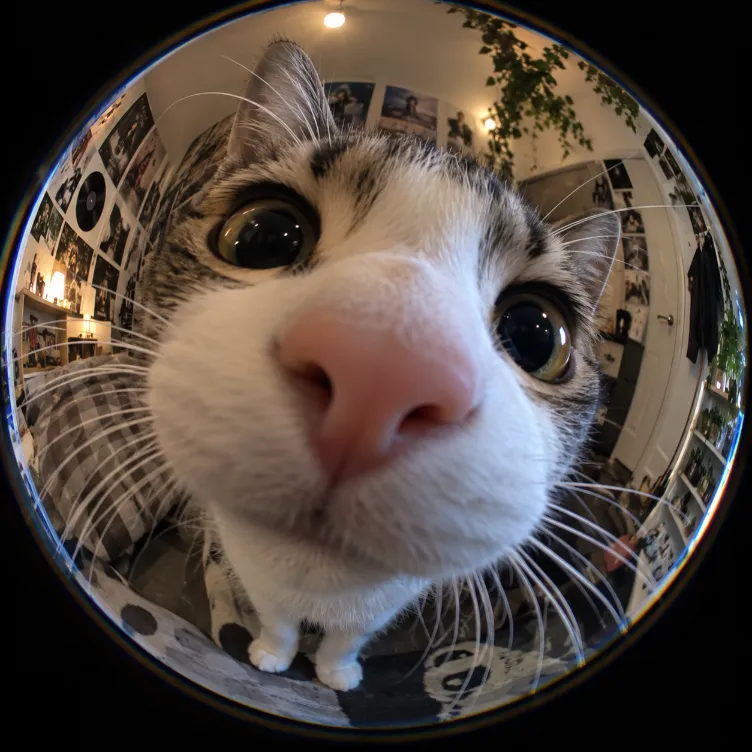
Popular Fish Eye PFP Styles
You can find a Fish Eye PFP in several styles, from funny internet memes to dark and artistic images. Your preferred style can help your profile feel consistent across different social platforms.
| PFP style | Main features | Best use |
|---|---|---|
| Funny fisheye | Distorted faces and exaggerated proportions | Meme accounts |
| Fish close-up | Large eyes, scales, and detailed facial features | Unique avatars |
| Shark PFP | Sharp teeth and a wide-angle view | Gaming profiles |
| Cute fish PFP | Bright colors and friendly expressions | Casual social accounts |
| Dark fish PFP | Black backgrounds and dramatic lighting | Alternative profiles |
| Anime fisheye | Exaggerated character faces and curved perspective | Anime communities |
| Retro fisheye | Grain, flash photography, and vintage effects | Aesthetic accounts |
| Surreal fish PFP | Unusual proportions and dreamlike colors | Creative profiles |
Why Do Users Choose Fish Eye PFPs?
A Fish Eye PFP can make a small profile image feel unusual and memorable. The distorted perspective gives ordinary subjects a playful appearance, while fish-themed artwork adds a more specific visual identity.
Here are some reasons this style appeals to online users:
- Humor: A close-up face or fish with oversized eyes can create a funny effect.
- Originality: The curved perspective gives a familiar subject an unusual appearance.
- Visual personality: Bright fish, dark sharks, and strange edits suit different online moods.
- Gaming identity: A bold image can work well as an avatar in multiplayer games.
- Creative freedom: You can use photography, digital artwork, cartoons, or edited images.
- Easy customization: Cropping, color changes, and filters can give the same image a different look.
The strongest choice depends on your personal taste. A humorous image suits a casual account, while a dark or minimal design may fit a more serious online identity.
Best Fish Eye PFP Ideas
If you need inspiration, start with a subject that looks good inside a circular crop. Images with one clear focal point usually work better than pictures with many small details.
1. Funny Fish Close-Up
- Choose a fish photographed from the front, with its eyes near the center. A close crop can make the image look strange and amusing, especially for a meme profile.
2. Fisheye Selfie
- A selfie taken with a fisheye lens or a suitable editing filter can create an exaggerated face and curved background. This style works well for casual social profiles.
3. Shark Profile Picture
- A shark photographed from the front can give your profile an intense look. Dark blue water, visible teeth, and a close camera angle can add drama.
4. Cute Goldfish PFP
- A goldfish with orange scales and large eyes suits a colorful, friendly profile. A simple background helps the subject remain visible at small sizes.
5. Anglerfish PFP
- An anglerfish has unusual features that suit dark, surreal artwork. Use a deep-sea background, dramatic shadows, or glowing details for a mysterious appearance.
6. Anime Fisheye PFP
- Anime characters with exaggerated expressions can work well with fisheye distortion. A close-up face and bold outlines help the image remain clear as an avatar.
7. Retro Camera PFP
- A retro fisheye image can feature direct flash, visible grain, curved walls, and a close subject. This look suits users who prefer vintage photography aesthetics.
8. Weird Meme PFP
- A deliberately awkward face, distorted animal, or oversized fish eye can turn a simple avatar into a joke. Keep the main subject near the center so the humor remains visible after cropping.
How to Choose the Right Fish Eye PFP
The right profile picture depends on your platform, preferred style, and how the image appears at a small size. A detailed image may look excellent on a full screen but lose its character inside a tiny avatar.
Use these points to guide your selection:
- Check the crop: Keep the face, eye, or fish near the center.
- Use clear contrast: Separate the subject from the background.
- Pick suitable colors: Bright colors can feel playful, while darker shades create a dramatic mood.
- Avoid excess detail: Tiny objects and busy backgrounds may disappear at avatar size.
- Match your account: A gaming profile can use a shark or dark anime image, while a casual account may suit a cute fish.
- Check image quality: Start with a sharp image instead of a heavily compressed file.
How to Make a Fish Eye PFP
You can create your own Fish Eye PFP using a photo editor, a camera app, or a design tool with lens-distortion effects.
- Choose a subject: Select a selfie, fish photograph, cartoon, pet, or character image.
- Apply the effect: Use a fisheye or lens-distortion filter if you want curved perspective.
- Adjust the crop: Move the main subject toward the center of the frame.
- Edit the colors: Adjust brightness, contrast, saturation, or shadows to match your preferred style.
- Set the dimensions: A square image is a practical starting point for most profile-picture uploads.
- Preview the result: Check the image at a small size and make sure the main details remain clear.
- Save the image: Export it in a format supported by your chosen platform.
You can also skip the editing process and use an existing fish photograph or illustration. A naturally unusual fish face may deliver the desired look without extra effects.
Where to Find Fish Eye PFP Images
You can search for profile-picture ideas on image-sharing platforms, art communities, photography websites, and meme pages. Use a search phrase that describes the exact appearance you want.
Try these search terms:
- Fish Eye PFP
- Funny Fish PFP
- Fisheye Lens Profile Picture
- Weird Fish Avatar
- Shark Close-Up PFP
- Cute Fish Profile Picture
- Fisheye Anime PFP
- Dark Fish Avatar
- Retro Fisheye Photography
- Surreal Fish Eye Image
Before using an image, check its usage permissions. A picture appearing in search results does not automatically mean you can reuse it for commercial purposes or repost it without restrictions.
Best Platforms for a Fish Eye PFP
A Fish Eye PFP can suit many online platforms, but each service may crop or display avatars differently.
| Platform | Suggested style | Helpful tip |
|---|---|---|
| Discord | Funny, anime, or dark fisheye | Keep the subject centered |
| Retro or aesthetic fisheye | Use strong colors and clean framing | |
| TikTok | Funny or expressive close-up | Choose an image that reads clearly at small sizes |
| Fish meme or unusual animal | Use a recognizable central subject | |
| Gaming accounts | Shark, monster, or anime | Favor bold shapes and contrast |
| YouTube | Funny or recognizable avatar | Avoid tiny text and fine details |
Check each platform’s current upload requirements before saving your final image. A square source image generally makes cropping easier, but the displayed shape can vary by service.
Related Article: Shelly PFP
Fish Eye PFP vs. Regular PFP
A regular profile picture can use almost any camera angle or composition. A fisheye-style image places more emphasis on a wide field of view and curved perspective.
| Feature | Fish eye PFP | Regular PFP |
|---|---|---|
| Perspective | Curved or exaggerated | Usually natural |
| Appearance | Playful, unusual, or surreal | Can be simple or formal |
| Main focus | Close-up subject or visual distortion | Subject, setting, or portrait |
| Editing style | May use lens effects | May use standard photo edits |
| Common purpose | Humor and creative expression | Personal or professional identity |
Neither style suits every account. Your choice depends on the image you want to present and the audience you have in mind.
Tips for Getting a Clear Fish Eye PFP
A good avatar should remain recognizable after a platform reduces its size. Follow these practical tips for a cleaner result:
- Choose one main subject instead of a crowded scene.
- Keep the most expressive eye or facial feature visible.
- Avoid placing important details close to the corners.
- Use a background that contrasts with the subject.
- Preview the picture inside a circular crop.
- Save a high-quality version before uploading.
- Avoid adding small text that becomes unreadable on mobile screens.
For a fish-themed avatar, the eyes and face can provide the strongest focal point. For a fisheye selfie, make sure the distortion looks intentional rather than like an accidental camera error.
Final Thoughts on Fish Eye PFP
A Fish Eye PFP gives your online profile a distinctive look through unusual perspective, expressive fish faces, or creative lens distortion. You can choose a cute goldfish, a dramatic shark, a funny close-up, or a retro-style selfie to suit your taste.
For the best result, use a sharp image, keep the main subject centered, and check the crop before uploading. A simple, recognizable avatar can work across social media, gaming platforms, and online communities.
What does Fish Eye PFP mean?
Fish Eye PFP refers to a profile picture featuring a fish or using a fisheye lens effect. The exact meaning depends on the image and the user’s intended style.
How can I get a Fish Eye PFP?
Search for fish-themed avatars, fisheye photography, or lens-distortion artwork. You can also edit your own photo with a fisheye filter.
Can I use a Fish Eye PFP on Discord?
Yes. You can use a suitable image as your Discord avatar, subject to the platform’s current upload rules and content policies.
Which Fish Eye PFP style works for gaming?
Sharks, dark fish artwork, anime close-ups, and funny distorted faces are all options. Choose an image that remains clear at a small size.
Can I make a fisheye profile picture with my phone?
Yes. A compatible camera app or photo editor can apply a fisheye effect. The available controls depend on your device and software.
Are Fish Eye PFP images free to use?
Some images are free to download, while others have copyright or licensing restrictions. Check the creator’s terms before using an image, particularly for business or promotional accounts.