
A Danny Phantom PFP is a great choice for fans of the Nickelodeon animated series who want a cartoon avatar with a supernatural look. Danny Fenton’s ghost form, glowing green eyes, white hair, and black-and-white suit give profile pictures a distinct appearance. Fans can use these images on Discord, TikTok, Instagram, YouTube, gaming accounts, and other social platforms.
What Makes Danny Phantom PFP Popular?
Danny Phantom has a recognizable animated design that works well in colorful and minimalist profile pictures. His ghost powers, green energy effects, and confident expressions give artists plenty of options for memorable avatars.
Here are some reasons fans choose a Danny Phantom profile picture:
- Ghost design: White hair, green eyes, and a dark suit create a striking look.
- Nostalgic appeal: The cartoon brings back memories for viewers who watched Nickelodeon.
- Multiple art styles: Fans can pick anime edits, classic cartoon screenshots, fan art, or dark-themed designs.
- Gaming aesthetic: Danny’s supernatural appearance suits gaming profiles and online communities.
- Easy customization: Green glows, dark backgrounds, and comic-style effects can give an avatar a personal touch.
Best Danny Phantom PFP Ideas
The right Danny Phantom PFP depends on your preferred style and the platform where you plan to use it. Some fans prefer original cartoon artwork, while others enjoy dramatic edits and creative fan designs.
1. Classic Danny Phantom PFP
A classic Danny Phantom avatar features Danny in his original ghost form, with white hair, green eyes, and his signature black-and-white outfit. This style suits fans who prefer the character’s original animated appearance.
Choose a clear image with Danny’s face near the center. A simple background helps the character remain visible in a small circular profile icon.
2. Danny Phantom Green Glow PFP
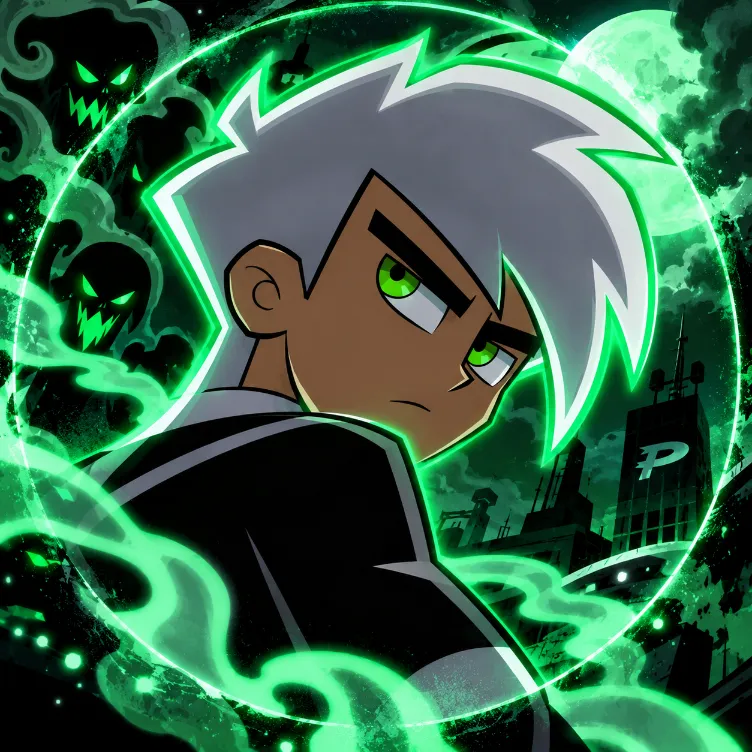
Green energy effects give Danny Phantom a supernatural appearance. This design may feature glowing eyes, green mist, ghostly flames, or an illuminated outline around his face.
This style works especially well for Discord and gaming accounts. Dark backgrounds help the green effects appear brighter without making the image difficult to read.
3. Dark Danny Phantom PFP
A dark Danny Phantom PFP uses black backgrounds, deep green shades, dramatic shadows, and serious facial expressions. It suits users who prefer mysterious or edgy avatars.
You can look for fan edits featuring Danny’s ghost form against a shadowy background. Keep the facial details visible so the image remains recognizable at smaller sizes.
4. Danny Phantom Anime PFP
Anime-inspired fan art gives Danny a different visual style through sharper facial features, expressive eyes, detailed hair, and dramatic lighting.
This option works well for anime communities, gaming profiles, and accounts that feature cartoon or illustrated avatars. Since anime-style images may differ from the original show, check that the design still matches your preferred version of Danny.
5. Cute Danny Phantom PFP
A cute Danny Phantom PFP may show Danny with a cheerful expression, simplified features, a playful pose, or a pastel background. Some fan artists create chibi versions with oversized heads and expressive eyes.
This style suits casual social accounts and users who prefer friendly avatars instead of intense supernatural artwork.
6. Danny Phantom Action PFP
Action-themed profile pictures show Danny using his ghost powers, flying through the air, or preparing for a supernatural battle. Green energy, motion effects, and dramatic poses can make these images more exciting.
For a clean result, select artwork with one main subject and limited background detail. Too many effects may disappear after the platform crops the image.
7. Danny Phantom Black and White PFP
A monochrome Danny Phantom avatar uses black, white, and gray tones for a simple visual style. This design can emphasize Danny’s hair, facial expression, and suit without relying on bright colors.
It is a suitable option for minimalist accounts or users who prefer a coordinated profile theme.
8. Danny Phantom PFP With Sam or Tucker
Fans who enjoy the friendships in the series may prefer a profile picture featuring Danny with Sam Manson or Tucker Foley. These designs can show a favorite scene, a group pose, or a fan-made illustration.
Group avatars work best if the characters’ faces remain large enough to see after cropping. A close-up composition usually works better than a full-body image for a small profile icon.
Danny Phantom PFP Styles at a Glance
| PFP style | Main visual features | Best suited for |
|---|---|---|
| Classic Danny | Original ghost suit and white hair | General social profiles |
| Green Glow | Green eyes and ghost energy | Gaming and Discord |
| Dark Danny | Shadows and dark backgrounds | Edgy profiles |
| Anime Danny | Detailed illustration and dramatic eyes | Anime communities |
| Cute Danny | Chibi art and playful expressions | Casual accounts |
| Action Danny | Flying poses and ghost powers | Gaming channels |
| Black and White | Monochrome artwork | Minimalist profiles |
| Danny with Friends | Danny, Sam, or Tucker together | Fan communities |
Best Danny Phantom PFP for Discord
Discord profile pictures appear beside usernames in servers, messages, and voice channels. A close-up Danny Phantom avatar can help your profile remain clear at a small size.
For Discord, consider these options:
- A close-up of Danny’s ghost form with glowing green eyes.
- A dark avatar with a bright green outline.
- A classic cartoon screenshot with a clear facial expression.
- A fan-art portrait with a simple background.
- A matching Danny Phantom avatar for a group of friends.
Square images work well as a starting point. Keep Danny’s face near the center because Discord displays profile pictures in a circular crop in many parts of the interface.
Related Article: Fish Eye PFP
Danny Phantom PFP for TikTok and Instagram
TikTok and Instagram suit colorful cartoon avatars, expressive character portraits, and nostalgic fan edits. A well-cropped Danny Phantom image can give your account a consistent animated theme.
For TikTok, choose a recognizable face or ghost transformation pose. For Instagram, you might prefer a clean illustration with a coordinated background color.
Before uploading, check the image inside a circular crop. Make sure the hair, eyes, and main facial details remain visible. Avoid placing important features close to the outer edges.
Danny Phantom PFP for Gaming Profiles
Danny Phantom is a suitable avatar choice for gamers who enjoy supernatural characters, animated series, and action-oriented designs.
Consider these styles for gaming accounts:
- Competitive look: A serious close-up with glowing eyes.
- Retro cartoon look: Artwork that resembles the original Nickelodeon animation.
- Neon look: Green lighting against a black or dark gray background.
- Minimal look: Danny’s face or ghost symbol against a plain background.
- Custom fan-art look: An original illustration with your preferred colors.
Choose an image that remains clear at the small sizes used by many gaming platforms. Strong contrast and a simple composition usually work better than tiny decorative details.
How to Choose a High-Quality Danny Phantom PFP
A good profile picture needs more than an appealing character design. Resolution, cropping, contrast, and image quality all affect the final appearance.
Use these tips to select an avatar:
- Check the resolution: Start with a sharp square image rather than a blurry thumbnail.
- Focus on the face: Danny’s face should remain easy to identify after cropping.
- Pick suitable colors: Green and black create a supernatural look, while white backgrounds offer a cleaner style.
- Avoid excessive effects: Heavy filters can hide the character’s facial details.
- Preview the crop: Check how the image looks inside a circle.
- Keep the design consistent: Match the avatar with your banner or other profile graphics for a themed account.
- Check usage permissions: Fan art may belong to its creator, so review the artist’s rules before reposting or using the image commercially.
Where to Find Danny Phantom PFP Images
Several online platforms can help you find Danny Phantom avatars, fan art, and cartoon-inspired profile pictures.
- Pinterest: Search for Danny Phantom PFP, Danny Phantom icon, or Danny Phantom aesthetic.
- DeviantArt: Browse fan illustrations and character portraits. Review each artist’s usage policy.
- Tumblr: Search for animated-series edits, fan art, and themed icons.
- Reddit: Look through relevant animation and fan communities for recommendations and artwork.
- Image search engines: Use specific phrases such as “Danny Phantom green eyes PFP” or “Danny Phantom dark icon.”
Check the original source before saving an image. A repost may not identify the artist or provide permission for reuse. Giving credit is helpful, but it does not automatically grant usage rights.
How to Make Your Own Danny Phantom PFP
Creating a personalized Danny Phantom avatar gives you more control over the colors, composition, and overall appearance.
Follow these steps:
- Select a cartoon image or artwork that you have permission to edit.
- Crop the image into a square format.
- Position Danny’s face near the center.
- Adjust brightness and contrast to improve visibility.
- Add a subtle green glow or a simple background if it suits your style.
- Export the image as a high-quality PNG or JPEG.
- Preview the finished avatar at a small size before uploading it.
You can use an image editor such as Canva, Photopea, or another graphics application for basic cropping and color adjustments. Avoid adding so many effects that Danny’s original design becomes difficult to identify.
Danny Phantom PFP Image Size and Quality
Different platforms may use different image dimensions and compression settings. A square source image offers a convenient starting point for most profile-picture designs.
| Image feature | Recommended approach |
|---|---|
| Shape | Square, 1:1 aspect ratio |
| Source quality | Sharp, high-resolution artwork |
| Composition | Centered face or upper-body portrait |
| File type | PNG for clean graphics; JPEG for standard images |
| Background | Simple, contrasting colors |
| Final check | Preview at small size and inside a circle |
These are general design recommendations rather than fixed requirements for every platform. Check the current upload limits of your chosen service before exporting.
Final Thoughts on Danny Phantom PFP
A Danny Phantom PFP gives fans plenty of creative options, from classic cartoon portraits to neon-green ghost edits, anime-inspired illustrations, and cute character icons. Pick a style that suits your online personality, keep the image clear at small sizes, and check the artist’s permissions before uploading fan art. A carefully selected avatar can give your profile a distinct look while celebrating one of Nickelodeon’s memorable animated characters.
What does Danny Phantom PFP mean?
Danny Phantom PFP means a Danny Phantom profile picture. It refers to an avatar featuring Danny Fenton, his ghost form, or related artwork from the animated series.
Which Danny Phantom PFP style looks best?
The best style depends on your taste. Green-glow portraits suit gaming profiles, classic cartoon images appeal to longtime fans, and cute illustrations work well for casual social accounts.
Can I use a Danny Phantom PFP on Discord?
Yes, you can use an image featuring Danny Phantom as your Discord avatar, subject to the image’s usage rights and the platform’s current rules.
Where can I find Danny Phantom aesthetic icons?
Pinterest, Tumblr, DeviantArt, and relevant Reddit communities are useful places to search for fan-made icons and aesthetic edits. Check the original creator’s permissions before reusing artwork.
How do I make my Danny Phantom PFP look sharper?
Start with a high-resolution source image, avoid excessive compression, use moderate contrast, and keep Danny’s face centered. Preview the image at the size used by your profile.
Can I use Danny Phantom fan art as my profile picture?
That depends on the creator’s terms. Some artists permit personal profile-picture use, while others restrict reposting or editing. Review the stated permissions or ask the artist before using their work.