
A Kuromi PFP is a profile picture featuring Kuromi, the popular Sanrio character with a black jester-style hood and a pink skull on the front. Her appearance combines cute cartoon charm with a cheeky, rebellious attitude, making her a great choice for social media avatars, gaming accounts, and messaging apps.
From soft pink edits to dark gothic artwork, Kuromi profile pictures suit many visual styles. Some fans prefer a simple cartoon portrait, while others enjoy purple backgrounds, glitter effects, anime-inspired edits, or matching icons with friends.
The best Kuromi PFP does not need complicated effects. A clear image, a pleasing color palette, and a crop that keeps her face visible can give your profile a polished look.
What Makes Kuromi a Popular PFP Choice?
Kuromi has a distinctive design that remains easy to spot inside a small circular avatar. Her black hood, pointed ears, pink skull emblem, and expressive face give artists plenty of visual details to work with. Sanrio presents her as mischievous, with a girly side that contrasts with her tough appearance.
Here are a few reasons fans pick a Kuromi profile picture:
- Cute appearance: Her cartoon design suits kawaii and pastel themes.
- Edgy personality: Black clothing, sharp shapes, and cheeky expressions fit darker aesthetics.
- Flexible colors: Pink, purple, black, white, and silver work well with her design.
- Fandom appeal: Sanrio fans can use her image to show their interest in the character.
- Matching profile options: Friends can pair Kuromi with My Melody or choose coordinated character artwork.
- Easy personalization: Stickers, frames, hearts, stars, and small accessories can give an avatar a personal touch.
A good Kuromi PFP can feel sweet, moody, funny, or bold, depending on the artwork and editing style you prefer.
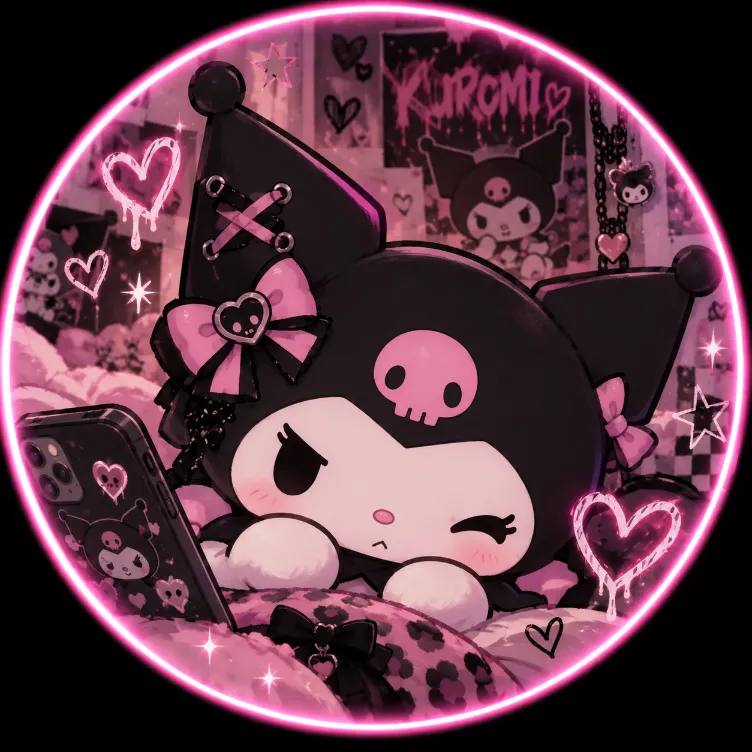
Kuromi Character Profile
Sanrio’s character information provides several details that fans may enjoy using as inspiration for profile designs.
| Detail | Information |
|---|---|
| Character | Kuromi |
| Brand | Sanrio |
| Debut year | 2005 |
| Birthday | October 31 |
| Signature look | Black hood with a pink skull |
| Personality | Mischievous, with a girly side |
| Favorite color | Black |
| Favorite food | Pickled scallions |
| Hobby | Keeping a diary |
| Rival | My Melody |
These traits give fans several ways to style a Kuromi avatar. Her black hood suits dark edits, the pink skull works with bright accents, and her playful personality fits expressive or humorous profile pictures.
Best Kuromi PFP Styles for Every Aesthetic
Kuromi artwork comes in many forms, from sweet pastel portraits to dramatic black-and-purple edits. Your preferred style can guide the colors, facial expression, background, and accessories in your avatar.
1. Cute Kuromi PFP
A cute Kuromi PFP suits fans who enjoy cheerful cartoon art and soft decorative details. Look for rounded illustrations, pink hearts, tiny stars, and gentle expressions.
Popular design ideas:
- Kuromi holding a heart or a small plush toy.
- A pink background with white sparkles.
- A close-up portrait with rosy cheeks.
- A chibi drawing with an oversized head and tiny body.
- A pastel frame with bows and decorative stars.
Best colors: Baby pink, white, lavender, and soft gray.
This style works well for Instagram, TikTok, WhatsApp, and personal Discord accounts. A simple face portrait also remains easy to recognize at small sizes.
2. Aesthetic Kuromi PFP
An aesthetic Kuromi PFP uses coordinated colors, balanced framing, and carefully selected visual details. The goal is a clean avatar with a distinct mood rather than a crowded collection of effects.
Popular aesthetic treatments feature:
- Lavender gradients and tiny white stars.
- Film grain and soft-focus lighting.
- Pink borders around a black character portrait.
- Vintage stickers and scrapbook textures.
- Hearts, crescent moons, and delicate sparkles.
- Minimal backgrounds with one or two accent colors.
A pastel aesthetic suits soft, dreamy profiles. A grunge edit suits users who prefer a rougher, more alternative look.
For a coordinated profile, match the avatar with your banner, bio colors, and pinned posts. Repeating a few visual details can make the overall design feel more intentional.
3. Dark Kuromi PFP
A dark Kuromi PFP focuses on black backgrounds, deep purple shades, sharp contrasts, and dramatic expressions. It suits gaming profiles, alternative fashion fans, and users who prefer a moody online aesthetic.
Try these design ideas:
- Black and violet lighting behind Kuromi.
- A dark portrait with a bright pink skull.
- Silver chains or gothic frame details.
- Deep red accents paired with black.
- A monochrome illustration with one pink detail.
- A shadowy background with the face kept bright.
Avoid making the entire picture too dark. Kuromi’s face and signature hood should remain visible, even on a small screen. A bright pink accent can preserve the character’s identity without taking away from the darker mood.
4. Purple Kuromi PFP
Purple works particularly well with Kuromi’s black hood. Lavender gives an avatar a soft appearance, while deep violet creates a more dramatic finish.
Some attractive combinations are:
| Color palette | Design mood | Suitable details |
|---|---|---|
| Lavender and white | Soft and peaceful | Stars, clouds, small hearts |
| Violet and black | Dark and bold | Moon shapes, shadows, silver lines |
| Purple and pink | Cute and playful | Bows, glitter, hearts |
| Lilac and gray | Clean and modern | Thin borders, simple gradients |
| Deep purple and red | Dramatic | Neon edges, glowing accents |
A purple Kuromi PFP also pairs nicely with a matching phone wallpaper or Discord banner. Keep the background simple enough to preserve the face and hood.
5. Pink Kuromi PFP
Pink Kuromi profile pictures focus on her softer side. Pale pink creates a delicate appearance, while hot pink offers a brighter, more playful effect.
Try a design featuring:
- Pink ribbons around the frame.
- A heart-shaped background.
- White lace details.
- Glossy pink highlights.
- A pastel checkerboard pattern.
- Small hearts around Kuromi’s hood.
Pink and black make a particularly balanced pair. Black keeps her signature appearance clear, while pink softens the overall design.
6. Kuromi Anime PFP
Anime-inspired Kuromi avatars use expressive eyes, dramatic lighting, detailed shading, and stylized backgrounds. Some artists keep her original cartoon appearance, while others create fan interpretations with a more elaborate illustration style.
Ideas for this look:
- A close-up with dramatic eye highlights.
- A purple neon background.
- Manga-style black-and-white shading.
- A soft anime portrait with pink accents.
- A dramatic crop focused on her face.
- A hand-drawn fan-art design with a simple border.
Check the image’s source and usage terms before reposting artwork. A fan-made drawing may have different permissions from an official Sanrio image.
7. Funny Kuromi PFP
Funny Kuromi PFPs suit users who prefer expressive, playful, or slightly chaotic avatars. An exaggerated expression can make a profile feel less formal and more entertaining.
Ideas worth trying:
- An angry Kuromi face.
- A sleepy expression with closed eyes.
- A zoomed-in reaction image.
- Kuromi with an exaggerated pout.
- A silly pose with a colorful background.
- A cartoon edit with a humorous caption.
Keep captions short and readable. Long text becomes difficult to read inside a circular avatar, particularly on mobile devices.
8. Kuromi PFP for Boys
Kuromi profile pictures suit anyone who enjoys the character. For a darker or more minimal look, try black-and-white art, deep purple backgrounds, gaming-inspired graphics, or monochrome edits.
Suitable choices include:
- A black Kuromi icon with a white border.
- A purple-and-black gaming avatar.
- A simple character portrait with no extra decorations.
- A grayscale drawing with one pink accent.
- A pixel-art version of Kuromi.
- A dark cartoon edit with a sharp crop.
There are no gender rules for a character PFP. Pick the artwork that matches your personal taste and the atmosphere you want for your account.
9. Kuromi PFP for Girls
For a soft and decorative look, pink, lilac, white, and pastel blue work well with Kuromi’s signature design. Small bows, flowers, lace patterns, and glitter can add detail without overcrowding the image.
You can also try:
- A coquette-inspired Kuromi portrait.
- A pink-and-white heart frame.
- A pastel flower background.
- A cute character close-up.
- A matching Kuromi and My Melody pair.
- A soft purple edit with tiny stars.
These designs work across different social platforms, so the same avatar can suit several accounts.
10. Kuromi PFP with My Melody
Kuromi and My Melody make a recognizable character pair. Their contrasting colors create a balanced look for friends, couples, siblings, or anyone who enjoys both Sanrio characters.
For matching avatars, try these combinations:
- Kuromi in black and pink; My Melody in pink and white.
- Two portraits with the same heart-shaped frame.
- Split artwork that forms one complete image.
- Matching pastel backgrounds with different character poses.
- Coordinated dark and light edits.
- Two icons with mirrored expressions.
The strongest matching sets use the same framing and image style. Each person can keep a separate character portrait while retaining a shared theme.
Best Kuromi PFP Ideas for Different Platforms
The right image size and crop depend on the platform. Most profile images appear small, and many services display them inside a circle.
| Platform | Recommended style | Practical tip |
|---|---|---|
| TikTok | Bright, expressive Kuromi portrait | Keep the face near the center |
| Pastel, coquette, or aesthetic edit | Use a clean circular crop | |
| Discord | Dark, purple, or gaming-themed icon | Check visibility in dark mode |
| Cute or simple cartoon portrait | Avoid tiny decorative text | |
| Pastel, collage, or fan-art style | Choose a clear thumbnail | |
| Roblox | Bold cartoon-style avatar image | Keep the main character easy to spot |
| X | Minimal or high-contrast portrait | Avoid busy backgrounds |
| Snapchat | Cute or funny character edit | Use a recognizable close-up |
| Telegram | Clean portrait with a bright accent | Leave space around the face |
| YouTube | High-contrast character icon | Check the image at small sizes |
Platform settings and display shapes can change. Check the current upload requirements before preparing a final image.
How to Choose the Best Kuromi PFP
A profile picture should look good on your preferred platform and match the style you enjoy. You do not need complicated editing or expensive software to find a suitable Kuromi avatar.
Use these points as a selection guide:
- Pick a clear character portrait: Kuromi’s face and hood should remain visible after cropping.
- Choose two or three main colors: Black, pink, and purple make an easy starting palette.
- Match your online style: A cute design suits a softer profile, while a dark edit suits a gaming or alternative aesthetic.
- Check the image quality: Avoid blurry screenshots, stretched pictures, and heavily pixelated artwork.
- Look at the background: Simple backgrounds usually work better in small profile icons.
- Check the crop: Keep important details away from the outer edges.
- Consider your other profile graphics: A matching banner or wallpaper can create a coordinated appearance.
- Respect the artist: Check the creator’s permission before reposting or editing fan art.
The best Kuromi PFP is the one you enjoy seeing beside your username. Trends can offer inspiration, but your own taste should guide the final choice.
Where to Find Kuromi PFP Images
Several online platforms offer character artwork, fan illustrations, and profile-picture inspiration.
Sanrio’s official website
Visit Sanrio’s official website to browse character products and artwork. Official material provides a reliable starting point for fans who prefer Kuromi’s original design.
Pinterest offers ideas for pastel edits, purple avatars, matching character pairs, and fan-art styles. Check the original creator’s page before saving an image for reuse.
Artist portfolios and fan communities
Artist pages can offer distinctive illustrations and custom avatar designs. Review the creator’s usage rules, especially for commercial accounts or edited versions.
Search phrases such as “cute Kuromi PFP,” “dark Kuromi icon,” “purple Kuromi avatar,” and “matching Kuromi My Melody PFP” can help narrow your results.
A search result does not automatically grant permission to repost an image. Check its original source and licensing terms.
How to Download and Set a Kuromi PFP
The exact steps vary by website or app, but this general process works for many profile-picture updates.
- Find your preferred design. Search for a Kuromi PFP matching your color palette and mood.
- Open the original image. Check that the picture has sufficient resolution and comes from a trustworthy source.
- Save the permitted image. Use the platform’s download option or the creator’s authorized download link.
- Crop the image. Keep Kuromi’s face, hood, and pink skull visible inside the central area.
- Open your profile settings. Find the avatar or profile-photo option in your chosen app.
- Upload the picture. Select the saved file and adjust its position.
- Preview the result. Check the avatar at a small size before saving your changes.
Some websites restrict image downloads or require an account. Follow their terms rather than bypassing those restrictions.
How to Create a Custom Kuromi PFP
Creating a personalized avatar gives you more control over the final appearance. A basic image editor can handle most simple changes.
Choose the Right Canvas
- A square canvas is a practical starting point for most avatars. A 512 × 512 pixel image provides a useful working size, though each platform may have its own requirements.
Select Your Color Palette
Choose colors that work well together. For example:
- Black, pink, and white for a classic Kuromi look.
- Lavender, purple, and silver for a dreamy aesthetic.
- Black, red, and gray for a dramatic edit.
- Baby pink, cream, and lilac for a soft appearance.
Add Small Details
- Decorative elements can personalize the design. Try a thin border, a few stars, small hearts, or a subtle gradient. Keep the character as the main focus.
Adjust Brightness and Contrast
- Dark images may lose detail on some screens. Increase brightness slightly or add a contrasting outline so the hood and face remain visible.
Export the Finished Image
- PNG works well for clean artwork and sharp edges. JPEG may suit photographs or images with complex backgrounds. Avoid repeated saving that reduces image quality.
Kuromi PFP Editing Tools
You can use a simple editing app to crop, resize, and decorate your selected image.
| Tool | Useful features | Best use |
|---|---|---|
| Canva | Templates, text, frames, and backgrounds | Beginners |
| Picsart | Filters, stickers, effects, and cutouts | Creative edits |
| Adobe Express | Image resizing and graphic design | Clean profile graphics |
| ibis Paint X | Brushes, layers, and drawing tools | Custom illustrations |
| Photopea | Browser-based image editing | Layer-based edits |
Visit the official sites for these tools to check current features, pricing, and usage terms.
You can create an attractive Kuromi avatar with only a few changes. Start with a clear portrait, choose a background, adjust the colors, and save a clean square image.
Common Kuromi PFP Mistakes to Avoid
Small design errors can make an otherwise attractive avatar hard to recognize.
- Too many stickers: Excessive decoration hides the character’s face.
- Low resolution: Blurry artwork loses detail on larger displays.
- Poor cropping: Cutting off the hood or skull removes recognizable elements.
- Excessive darkness: Deep shadows can hide the character against a black interface.
- Clashing colors: Too many bright shades can make the image look crowded.
- Unreadable text: Small captions rarely remain clear in a circular icon.
- Unauthorized artwork reuse: Public availability does not mean an artist has granted permission for every type of use.
A simple, well-cropped image usually performs better as a small avatar than a complicated design with numerous effects.
Kuromi PFP and Copyright Considerations
Kuromi is a Sanrio character, and official artwork may carry copyright and trademark protections. Fan-made illustrations may carry separate rights held by their creators.
For personal use, check the rules of the platform and the image source. For commercial use, merchandise, promotional graphics, or business branding, review the relevant permissions carefully.
Keep these points in mind:
- Credit the artist if their terms request or require it.
- Do not claim someone else’s drawing as your own.
- Avoid removing watermarks without permission.
- Check licensing conditions before modifying or distributing artwork.
- Use original artwork or properly licensed material for commercial projects.
A profile-picture upload does not transfer ownership of the original illustration.
Final Thoughts on Kuromi PFP
A Kuromi PFP offers plenty of creative options for social media, messaging apps, and gaming accounts. Cute pink portraits, purple aesthetic edits, dark gothic icons, funny expressions, and matching My Melody designs all provide different ways to personalize a profile.
Start with a clear image, choose a color palette that suits your style, and keep the main character visible after cropping. You can also create a custom design using simple editing tools, provided you respect the rights attached to the original artwork.
The most suitable Kuromi profile picture is one that feels right for your account and gives your online presence a personal touch.
What Does Kuromi PFP Mean?
Kuromi PFP means a Kuromi profile picture. PFP stands for “profile picture,” and the image usually features the Sanrio character in a cartoon portrait, aesthetic edit, or fan illustration.
Why Do Fans Like Kuromi Profile Pictures?
Kuromi has a distinctive black hood, pink skull, and mischievous personality. Her design suits cute, pastel, gothic, purple, and humorous avatar styles.
Which Colors Work Best for a Kuromi PFP?
Black and pink create a classic look. Lavender and purple offer a softer alternative, while red, silver, and gray suit darker edits.
Can I Use a Kuromi PFP on Discord?
Yes, you can upload a suitable image through Discord’s profile settings, subject to its current rules and upload requirements. A clear square image works well as a starting point.
How Do I Make a Matching Kuromi PFP with a Friend?
Choose matching artwork featuring Kuromi and My Melody, or use two portraits with the same background and frame. Coordinated colors can make the pair feel connected without requiring identical images.
Is a Kuromi PFP Suitable for Boys?
Yes. Kuromi is a character for fans of any gender. Black-and-purple edits, gaming icons, monochrome artwork, and minimalist portraits offer several styles to try.
Can I Use a Kuromi PFP on TikTok?
Yes, subject to TikTok’s current profile-image requirements. Choose an image with a clear face and a crop that remains recognizable at a small size.
Where Can I Find Free Kuromi PFP Images?
Pinterest, artist portfolios, and official character pages can provide starting points. Check the image’s source and permissions before downloading or reusing it.
Can I Create a Kuromi PFP on My Phone?
Yes. Mobile editing apps can help you crop images, add borders, adjust colors, and apply simple effects. A square canvas and a clear portrait make the process easier.
What Is the Difference Between a Cute and a Dark Kuromi PFP?
A cute Kuromi PFP uses soft colors, hearts, bows, and gentle expressions. A dark version relies on black backgrounds, deep purple shades, dramatic lighting, and stronger contrast.
Can I Use the Same Kuromi PFP on Every Social Platform?
You can use the same image across multiple accounts, subject to each platform’s rules and the image’s usage permissions. Preview the crop on every service because profile layouts may differ.
Is Fan Art Suitable for a Profile Picture?
Fan art can work well as an avatar, provided you respect the artist’s usage rules and any relevant platform policies. Ask for permission if the creator’s terms do not clearly allow your intended use.