
These profile pictures come in several designs, such as:
- Close-up portraits with serious facial expressions.
- HD photographs from concerts and music videos.
- Pictures featuring his signature hairstyles and tattoos.
- Black-and-white rapper portraits.
- Colorful edits with bold backgrounds.
- Cartoon and illustrated versions.
- Sniper Gang-inspired profile designs.
A good Kodak Black PFP gives a social media account a personal touch while showing appreciation for the rapper.
Who Is Kodak Black?
Kodak Black, whose legal name is Bill Kahan Kapri, was born Dieuson Octave on June 11, 1997, in Pompano Beach, Florida. He developed an interest in rap music during childhood and started recording music at a young age.
His 2014 track No Flockin helped establish his place in hip-hop. He later released successful projects such as Painting Pictures, Dying to Live, and Back for Everything.
His appearance, hairstyles, jewelry, tattoos, and streetwear provide plenty of inspiration for fan-made profile pictures.
Best Kodak Black PFP Styles
Different Kodak Black profile picture styles suit different social media accounts. Here are some popular ideas for fans looking for a fresh display picture.
1. Kodak Black HD PFP
HD Kodak Black pictures work well for users who prefer clear, sharp portraits. High-resolution photographs preserve facial details, clothing, jewelry, and tattoos.
For a clean profile appearance, select a photograph with:
- Clear facial details.
- Good lighting.
- A simple background.
- Sharp image quality.
- A centered face.
2. Kodak Black Aesthetic PFP
Aesthetic Kodak Black PFP designs suit fans who enjoy creative edits. These pictures use color filters, soft lighting, dark backgrounds, and artistic effects.
Popular color combinations include purple and black, blue and grey, red and black, and silver with dark shades.
3. Kodak Black Black and White PFP
Black-and-white Kodak Black profile pictures offer a simple yet bold appearance. Removing bright colors gives greater attention to facial expressions, shadows, and photograph details.
This style works particularly well on Instagram, Discord, and X.
4. Kodak Black Gangster PFP
Fans looking for an edgy profile picture can choose portraits featuring dark clothing, chains, sunglasses, and serious expressions.
Dark backgrounds and high-contrast editing give these pictures a strong hip-hop aesthetic.
5. Kodak Black Cartoon PFP
Cartoon Kodak Black PFP designs offer a creative alternative to ordinary photographs. Artists can turn his appearance into digital illustrations, comic-style portraits, and anime-inspired artwork.
These designs work well for gaming accounts, Discord servers, and personal social profiles.
Kodak Black PFP Ideas for Different Social Media Platforms
The right profile picture depends on the platform and the appearance you want for your account.
| Platform | Recommended PFP style | Best image format |
|---|---|---|
| HD portrait | Square | |
| TikTok | Colorful close-up | Square |
| Discord | Cartoon or dark edit | Square |
| Clear rapper portrait | Square | |
| X (Twitter) | Black-and-white photo | Square |
| YouTube | High-contrast portrait | Square |
| Snapchat | Casual Kodak Black photo | Square |
A square image works well across most platforms. Keep the face near the center to prevent automatic cropping from cutting off important details.
How to Choose the Best Kodak Black Profile Picture
Selecting a suitable Kodak Black PFP does not require complicated editing. A few simple details can help you find a picture that looks good on your account.
Consider these points:
- Image quality: Select HD photographs with sharp facial details.
- Background: Choose a simple or dark background for a cleaner appearance.
- Colors: Match the picture’s colors with your preferred account theme.
- Expression: Select a portrait with an expression that suits your personal style.
- Cropping: Keep the face centered inside the square frame.
- Resolution: Use a high-resolution image to avoid blurry results.
Avoid photographs with heavy watermarks, excessive filters, or poor lighting. A natural portrait can look better than an edit with too many effects.
How to Download a Kodak Black PFP
Finding and saving a Kodak Black profile picture takes only a few steps.
- Browse through available Kodak Black photographs.
- Select a picture that suits your preferred style.
- Open the image in its largest available size.
- Use the download or save option.
- Crop the picture into a square format.
- Upload it to your preferred social media platform.
How to Make Your Own Kodak Black PFP
Creating a personalized Kodak Black profile picture allows you to choose the exact colors, effects, and layout.
You can use editing applications such as Canva, PicsArt, or Photoshop.
Follow these simple steps:
- Choose a clear Kodak Black portrait.
- Open the image in your preferred editing application.
- Crop it into a 1:1 square shape.
- Adjust brightness, contrast, and sharpness.
- Add a dark, colorful, or gradient background.
- Apply a subtle filter.
- Save the final image in high quality.
You can also add your favorite song title or a short phrase to create a customized fan design. Avoid covering the face with large text or unnecessary stickers.
Best Kodak Black PFP Background Colors
Background color can change the entire appearance of a profile picture. Some shades work particularly well with dark clothing, jewelry, and portrait photography.
| Background color | Visual appearance | Suitable style |
|---|---|---|
| Black | Dark and bold | Gangster PFP |
| Purple | Artistic and stylish | Aesthetic PFP |
| Blue | Cool and clean | HD portrait |
| Red | Strong contrast | Edgy PFP |
| Grey | Minimal and simple | Monochrome PFP |
| White | Bright and clean | Classic portrait |
Choose a background that complements the original photograph rather than competing with it.
Why Do Fans Use Kodak Black PFP Images?
Fans select Kodak Black profile pictures for different personal and creative reasons. Some prefer his music-related photographs, while others enjoy his fashion, tattoos, hairstyles, and memorable public appearances.
Here are a few reasons behind their popularity:
- Music appreciation: Fans use his photographs to show support for his music.
- Personal style: His portraits offer inspiration for bold profile designs.
- Social media identity: A rapper-themed PFP gives an account a recognizable appearance.
- Fan communities: Supporters use similar pictures across music groups and online communities.
- Creative editing: His photographs work well with filters, typography, and digital artwork.
Final Thoughts
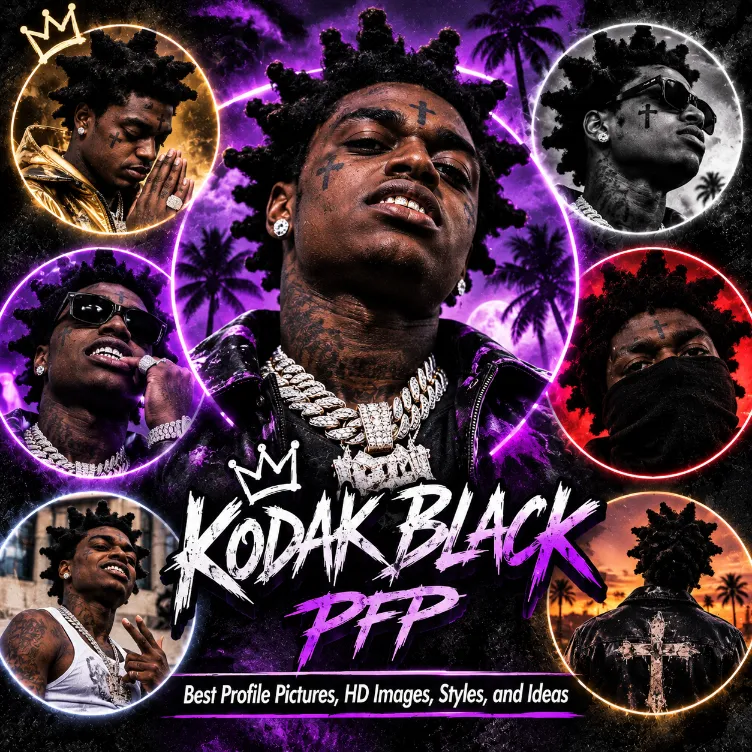
Kodak Black PFP images offer plenty of options for hip-hop fans who want a fresh social media display picture. From HD portraits and black-and-white photographs to cartoon artwork and dark aesthetic edits, each style gives an account a different appearance.
Choose a clear image, keep the face centered, and use colors that suit your preferred look. A simple, high-quality Kodak Black profile picture can make your social media account look stylish without excessive editing.
1. What does Kodak Black PFP mean?
Kodak Black PFP means a profile picture featuring rapper Kodak Black. Fans use these images on social media, gaming platforms, and messaging applications.
2. Where can I find Kodak Black HD PFP images?
You can find Kodak Black photographs through image search platforms, photography websites, and online fan communities.
3. Which Kodak Black PFP works best for Instagram?
A clear, centered HD portrait works well for Instagram. Dark backgrounds and simple edits can also create an attractive profile appearance.
4. Can I use Kodak Black pictures on Discord?
Yes. You can use suitable Kodak Black photographs as your Discord avatar. A square image with a centered face usually works well.
5. Are black-and-white Kodak Black PFP images popular?
Black-and-white edits appeal to fans who prefer minimal designs, strong contrast, and classic portrait photography.
6. Can I create a custom Kodak Black PFP?
Yes. Canva, PicsArt, and Photoshop offer editing tools for cropping, filters, background changes, and text effects.
7. What size should a Kodak Black PFP have?
A square 1:1 image works well for most social media avatars. A 1080 × 1080 pixel image provides a convenient high-resolution starting point.