
From simple cube avatars to detailed 3D-inspired artwork, Geometry Dash profile pictures offer plenty of room for creativity. Some gamers prefer their actual in-game icons, while others add custom colors, lightning effects, shadows, or dramatic backgrounds.
What Is a Geometry Dash PFP?
A Geometry Dash PFP is a profile picture inspired by the icons, characters, colors, and visual elements of Geometry Dash, the rhythm-based platform game developed by RobTop Games.
The game features several icon forms, including cubes, ships, balls, UFOs, waves, robots, spiders, and swings. These designs give gamers plenty of options for personalized avatars.
A Geometry Dash PFP can feature a screenshot of an in-game icon, fan-made artwork, or a custom graphic created with editing software.
| Feature | Details |
|---|---|
| Full form | Geometry Dash Profile Picture |
| Game creator | RobTop Games |
| Popular designs | Cube, ship, wave, UFO, robot |
| Common styles | Neon, 3D, minimalist, dark |
| Popular platforms | Discord, YouTube, TikTok |
| Useful file formats | PNG, JPG, WebP |
| Recommended canvas | 512 × 512 or 1024 × 1024 pixels |
| Customization | Colors, backgrounds, glow, outlines |
Best Geometry Dash PFP Ideas
Geometry Dash offers a wide selection of character designs that work beautifully as profile pictures. Each style creates a different visual appearance, from bright and playful to dark and mysterious.
- Classic Cube PFP
The cube remains one of the most popular choices for a Geometry Dash avatar. Its square shape fits neatly inside profile picture frames. Bright outlines, expressive faces, and contrasting colors make cube designs easy to identify.
- Neon Geometry Dash PFP
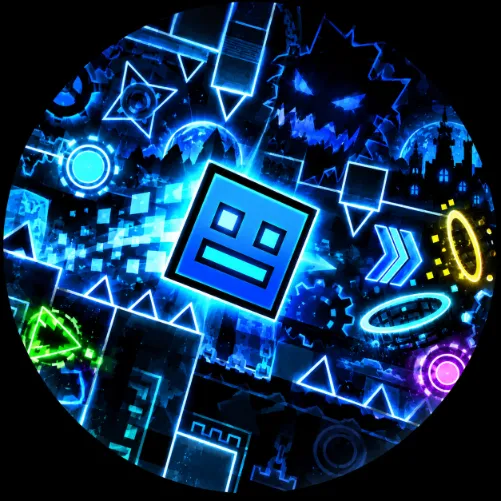
Neon designs use glowing edges, saturated colors, and dark backgrounds. Electric blue, purple, pink, and green work especially well for gamers who prefer a bold profile appearance.
- 3D Geometry Dash PFP
A 3D-inspired avatar adds depth through lighting, bevels, reflections, and realistic shadows. This style gives the familiar geometric icons a polished appearance without losing their original shape.
- Dark Geometry Dash PFP
Dark avatars feature black backgrounds, red accents, sharp outlines, and intense facial expressions. Demon-themed icons and glowing eyes work particularly well with this aesthetic.
- Cute Geometry Dash PFP
Cute avatars use pastel colors, friendly expressions, soft shadows, and simple backgrounds. Pink, lavender, mint, and baby blue create a cheerful look suitable for casual gaming profiles.
Popular Geometry Dash Icons for Profile Pictures
Geometry Dash features multiple character forms, each with a distinctive appearance. The cube works well for traditional avatars, but other icons can create equally appealing designs.
-
Cube: A square character with numerous face and pattern options.
-
Ship: A flying vehicle icon suitable for futuristic artwork.
-
Ball: A circular design that fits naturally inside round avatar frames.
-
UFO: A floating character that works well with colorful space backgrounds.
-
Wave: A triangular icon that suits sharp, geometric compositions.
-
Robot: A mechanical character suitable for metallic and cyberpunk themes.
-
Spider: An angular character with a striking silhouette.
-
Swing: A compact flying icon that offers another creative avatar option.
Each icon form has its own collection of unlockable designs inside the game. Players can personalize their appearance using available colors and cosmetic options.
How to Make a Custom Geometry Dash PFP
Creating a custom Geometry Dash profile picture requires only a game icon, an editing tool, and a suitable background. You can create a clean avatar in a few minutes or spend more time adding detailed effects.
Follow these steps:
-
Select your icon: Open Geometry Dash and visit the Icon Kit to find your preferred cube or another character.
-
Capture the design: Take a clear screenshot of your selected icon or use an appropriately licensed icon image.
-
Remove the background: Use an image editor to isolate the character.
-
Create a square canvas: Set the dimensions to 512 × 512 or 1024 × 1024 pixels.
-
Add your colors: Pick a background that contrasts with the icon.
-
Apply visual effects: Experiment with glowing borders, gradients, shadows, and geometric patterns.
-
Export your avatar: Save the completed design as a PNG for sharp edges and transparent background support.
Canva, Photopea, GIMP, and Adobe Photoshop provide useful editing features for this process. Photopea and GIMP also offer free editing options.
Geometry Dash PFP Color Combinations
Colors can completely change the appearance of a Geometry Dash avatar. A strong contrast between the character and background makes the design easier to see at smaller sizes.
| Color combination | Visual style | Suitable background |
|---|---|---|
| Blue and black | Futuristic | Dark gradient |
| Red and black | Aggressive | Black with red glow |
| Purple and pink | Neon aesthetic | Deep purple |
| Green and black | Cyberpunk | Dark geometric pattern |
| White and gold | Premium | Black or navy |
| Cyan and purple | Gaming aesthetic | Midnight blue |
| Pink and white | Cute | Pastel gradient |
| Orange and yellow | Energetic | Dark orange |
For a balanced design, use one main color, one supporting color, and a neutral background. Too many bright colors can make a small avatar difficult to read.
Geometry Dash PFP for Discord
Discord displays profile pictures in circular frames across many parts of its interface. This makes icon positioning particularly important.
A Geometry Dash Discord PFP looks cleaner with the main character near the center and enough space around its edges.
Consider these design tips:
-
Use a square image with a resolution of at least 512 × 512 pixels.
-
Keep the cube or character inside the central portion of the canvas.
-
Avoid placing decorative details in the corners.
-
Select bright outlines for dark-themed Discord profiles.
-
Preview the avatar at a small size before uploading it.
Animated Geometry Dash avatars can also look appealing. Discord supports animated GIF avatars for accounts with the relevant Nitro feature, subject to its current upload requirements.
Geometry Dash PFP for YouTube and TikTok
YouTube and TikTok creators can use Geometry Dash-inspired avatars to establish a consistent visual identity across their gaming content.
For YouTube, a custom cube featuring the creator’s preferred colors can complement video thumbnails and channel banners. A distinctive face or icon shape helps viewers identify the channel in comment sections.
TikTok avatars benefit from simpler artwork because profile images appear small on mobile screens.
For both platforms, prioritize:
-
A clearly visible main character.
-
Strong color contrast.
-
Minimal background details.
-
A centered square composition.
-
Consistent colors across profile graphics.
Avoid adding long usernames inside the avatar. Small text can lose readability after cropping and resizing.
Free Geometry Dash PFP Maker Tools
Several image-editing platforms offer the features needed to create Geometry Dash profile pictures.
| Tool | Main use | Free option |
|---|---|---|
| Canva | Templates, text, backgrounds | Yes |
| Photopea | Layer editing, effects, PNG export | Yes |
| GIMP | Detailed image editing | Yes |
| Adobe Photoshop | Advanced effects and artwork | Paid |
| Pixlr | Browser-based photo editing | Limited free access |
For beginners, Canva provides a straightforward interface for arranging shapes, backgrounds, and effects. Photopea offers greater control over layers and image adjustments without requiring a paid desktop editor.
How to Get Geometry Dash Icons for Your PFP
The Geometry Dash Icon Kit provides an excellent starting point for custom avatars. Players can view available designs and inspect the requirements for locked icons.
The game offers numerous cosmetic options, including primary and secondary colors, icon glow, trails, and death effects. The exact customization options depend on the game version.
Update 2.2, released in December 2023, expanded the Icon Kit with hundreds of additional designs and introduced the swing game mode.
For a profile picture, you can capture your selected character from the game and edit the screenshot into a square graphic. Community icon galleries also provide useful design references.
The Geometry Dash Icon Kit gallery displays the game’s various icon categories and unlock requirements.
Respect the original creator’s usage terms before downloading or modifying fan-made artwork, particularly for commercial branding.
Geometry Dash PFP Background Ideas
A background should support the character rather than compete with it. Geometry Dash already uses bright geometric visuals, so even a simple background can match the game’s aesthetic.
Some attractive background ideas are:
-
Neon grid: Glowing horizontal and vertical lines with a dark base.
-
Galaxy: Purple stars, blue highlights, and subtle space effects.
-
Gradient: Two complementary colors transitioning smoothly.
-
Lightning: Bright electric lines behind the character.
-
Pixel art: Retro blocks and pixelated patterns.
-
Minimalist: A solid color with a soft shadow.
-
Fire: Orange and red lighting around a dark icon.
-
Ice: Cyan highlights with frosted geometric shapes.
For extra depth, add a soft circular glow behind the icon. This creates separation between the foreground character and background without overcrowding the image.
Common Geometry Dash PFP Design Mistakes
Even an attractive icon can look poor after uploading due to sizing, cropping, or excessive effects.
One common problem involves using a low-resolution screenshot. Enlarging a small image can create blurry edges and visible pixelation. Starting with a larger image helps maintain clarity.
Another issue comes from excessive glow. A strong glow effect can hide the character’s original shape, especially on smaller screens.
Other mistakes worth avoiding:
-
Stretching the cube instead of maintaining its proportions.
-
Using backgrounds with nearly identical colors to the character.
-
Placing the character too close to the image edges.
-
Adding tiny text that disappears in circular frames.
-
Saving transparent artwork as JPG, which lacks transparency support.
-
Copying another creator’s custom artwork without permission.
A clean design with two or three coordinated colors usually works better than an avatar crowded with decorative elements.
Can I make a Geometry Dash PFP for free?
Yes. You can create a Geometry Dash avatar using free tools such as Photopea, GIMP, or Canva’s free features. Start with your preferred game icon, add a background, and export the final image.
What size works best for a Geometry Dash PFP?
A 512 × 512 pixel square works well for most profile picture designs. A 1024 × 1024 pixel canvas provides additional editing space. Individual platforms may resize or compress uploaded images.
Can I use a Geometry Dash cube as my Discord PFP?
Yes. A Geometry Dash cube works well as a Discord avatar. Center the character and leave enough room around the edges to accommodate circular cropping.
Where can I find Geometry Dash PFP designs?
You can browse Geometry Dash community artwork, icon galleries, and gaming design collections. The game’s Icon Kit also offers a large selection of characters for personal avatar projects.
Can I create a 3D Geometry Dash PFP?
Yes. Image-editing tools can add shadows, bevels, highlights, and perspective effects to create a 3D-inspired appearance. Dedicated 3D software offers further control over lighting and depth.
Which Geometry Dash PFP style looks best?
Neon cube designs work well for bold gaming profiles, while minimalist icons suit clean layouts. Dark red designs create an intense appearance, and pastel characters offer a softer aesthetic.
Can I use an animated Geometry Dash PFP?
Yes, on platforms and account tiers that support animated avatars. Export your animation in the required format and check the platform’s file-size restrictions before uploading.