
A Broly PFP brings raw Saiyan power, intense expressions, and striking anime visuals to your social media profile. From glowing green auras to fierce battle poses, Broly offers plenty of profile picture styles for Discord, TikTok, Instagram, WhatsApp, and gaming accounts.
Fans can pick a classic Dragon Ball Z Broly image, a modern Dragon Ball Super design, or a dark anime edit featuring his Super Saiyan transformation. Each option gives a profile a different look, ranging from aggressive and intimidating to clean and stylish.
Best Broly PFP Styles for Your Profile
Broly profile pictures feature several visual styles. Some fans prefer his powerful transformations, while others enjoy simple portraits with sharp details and darker backgrounds.
Here are some popular Broly PFP ideas:
- Legendary Super Saiyan Broly PFP: Green hair, muscular appearance, and an intense battle expression.
- Dark Broly PFP: Black backgrounds, deep shadows, and glowing eyes for a mysterious appearance.
- Broly Rage PFP: Angry facial expressions, clenched teeth, and dramatic anime effects.
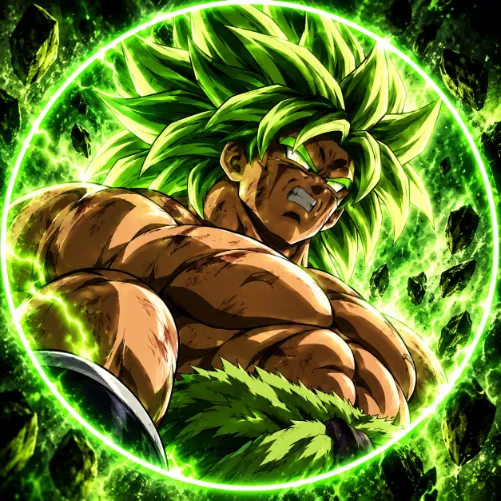
- Broly Green Aura PFP: Bright green energy surrounding Broly during a powerful transformation.
- Broly Manga PFP: Black-and-white manga artwork with bold outlines and detailed shading.
- Broly Matching PFP: Coordinated images featuring Broly alongside another Dragon Ball character.
- Broly Aesthetic PFP: Creative color grading, stylish lighting, and carefully cropped portraits.
- Broly 4K PFP: High-resolution artwork with sharp facial details and vivid colors.
Broly PFP Styles and Their Best Uses
Different Broly images suit different online platforms and personal preferences. The following table highlights popular options.
| Broly PFP Style | Main Visual Features | Best Platform |
|---|---|---|
| Legendary Super Saiyan | Green hair and powerful expression | Discord |
| Dark Broly | Black background and dramatic shadows | |
| Rage Broly | Angry face and battle energy | TikTok |
| Green Aura Broly | Bright green energy effects | Gaming profiles |
| Manga Broly | Monochrome artwork and sharp lines | Discord |
| Cute Broly | Soft colors and friendly expressions | |
| Matching Broly | Coordinated character portraits | Discord and Instagram |
| 4K Broly | High-resolution anime artwork | Multiple platforms |
Legendary Super Saiyan Broly PFP
The Legendary Super Saiyan Broly PFP remains a favorite among Dragon Ball fans who prefer aggressive anime profile pictures. His enormous physique, green hair, and powerful expressions create a striking visual appearance.
The original Broly appeared in the 1993 film Dragon Ball Z: Broly – The Legendary Super Saiyan. His iconic green-haired transformation helped establish the character’s distinctive visual identity.
A Legendary Super Saiyan Broly profile picture works especially well with:
- Bright green energy surrounding his body.
- Close-up portraits featuring his angry expression.
- Dark backgrounds that emphasize his glowing aura.
- Battle scenes featuring dramatic lighting.
- High-resolution artwork with sharp anime details.
For a strong Discord avatar, a close-up of Broly’s face usually works better than a full-body image. His expression remains clear even inside a small circular profile frame.
Dark Broly PFP for a Powerful Anime Look
A dark Broly PFP creates a serious and intimidating profile appearance. These images use black, charcoal, and dark green tones to emphasize Broly’s facial expressions and muscular design.
Dark edits work particularly well for gamers who prefer minimal backgrounds without excessive visual effects.
Popular dark Broly designs feature glowing green eyes, shadow-covered faces, subtle energy effects, and black backgrounds.
A half-face portrait can create an especially striking appearance. One side of Broly’s face remains in shadow, while green lighting highlights his eyes and expression.
Dark Broly profile pictures also suit Instagram accounts with black-themed feeds or anime gaming pages.
Broly Rage PFP for Discord and Gaming
A Broly rage PFP captures the character during his most aggressive battle moments. These pictures feature intense expressions, wide-open mouths, glowing energy, and dramatic transformation scenes.
Broly’s immense power and emotional intensity make rage-themed portraits especially suitable for competitive gaming profiles.
For the best visual appearance, select an image with:
- A clear close-up of Broly’s face.
- Strong contrast between the character and background.
- Bright green or yellow energy effects.
- Minimal text or unnecessary decorations.
- Enough space around the face for circular cropping.
A rage-themed Broly avatar can work particularly well on Discord, where small profile pictures benefit from strong facial expressions and bold colors.
Dragon Ball Super Broly PFP
The Dragon Ball Super Broly PFP features the redesigned version of Broly from the 2018 film Dragon Ball Super: Broly. This version has a different outfit, facial design, and character background from the original Dragon Ball Z movie version.
His appearance features black spiky hair in base form, Saiyan battle clothing, a green waist covering, and powerful transformations.
Dragon Ball Super Broly profile pictures offer several options:
- Base Form Broly: Black hair, serious expression, and a more natural appearance.
- Wrathful Broly: Intense yellow eyes and an aggressive expression.
- Super Saiyan Broly: Golden-green hair and explosive energy.
- Full Power Super Saiyan Broly: Green hair, immense muscles, and powerful green aura effects.
Full Power Super Saiyan Broly artwork works especially well for fans who prefer bright colors and action-heavy anime portraits.
Broly Manga PFP for a Black-and-White Style
A Broly manga PFP uses monochrome artwork, strong linework, and detailed shading. This style creates a clean appearance without relying on bright colors.
Manga-inspired Broly portraits can feature dramatic facial expressions, sharp hair outlines, and heavy shadows around the eyes.
Black-and-white profile pictures suit minimal Discord themes, monochrome Instagram pages, and anime accounts with simple visual designs.
For extra detail, select a manga-style image featuring Broly’s face in the center with a plain white, gray, or black background.
Cute Broly PFP for a Softer Profile Style
Not every Broly profile picture needs an aggressive appearance. Cute Broly PFP designs present the Saiyan in a more playful and friendly style.
Chibi illustrations, smiling portraits, and pastel-colored backgrounds create a softer version of the character.
Cute Broly profile pictures may feature:
- Chibi Broly with an oversized head and small body.
- Smiling Broly illustrations.
- Pastel green and pink backgrounds.
- Cartoon-style facial expressions.
- Friendly artwork featuring Broly and Cheelai.
These images work well for casual social media accounts and fans who prefer a cheerful anime aesthetic.
Broly Matching PFP for Friends and Couples
Broly matching PFP designs allow two users to display coordinated Dragon Ball profile pictures. The images can share similar colors, backgrounds, poses, or visual themes.
Popular matching combinations feature Broly with other Dragon Ball characters.
| Matching Characters | Visual Theme |
|---|---|
| Broly and Gogeta | Powerful battle opponents |
| Broly and Cheelai | Friendly character pairing |
| Broly and Goku | Saiyan battle theme |
| Broly and Vegeta | Intense Saiyan portraits |
| Broly and Paragus | Father-and-son theme |
Broly and Gogeta matching profile pictures work particularly well for gaming friends who enjoy competitive anime themes.
Broly and Cheelai designs offer a softer option with coordinated colors and character portraits.
Broly PFP 4K and HD Image Quality
A Broly PFP 4K image provides detailed artwork, clean outlines, and sharper visual effects. High-resolution source images give users more flexibility while cropping and editing.
However, a 4K image alone does not guarantee a better avatar. The final result also depends on composition, compression, and the platform’s display size.
For a clean Broly profile picture, consider these image specifications:
| Feature | Recommended Setting |
|---|---|
| Image shape | Square (1:1) |
| Standard resolution | 512 × 512 pixels |
| High-quality resolution | 1024 × 1024 pixels |
| File format | PNG or JPG |
| Main subject | Broly’s face or upper body |
| Background | Simple or high-contrast |
| Cropping | Centered with safe margins |
PNG works well for illustrations with sharp lines, while JPG suits detailed artwork with complex color gradients.
How to Choose the Best Broly PFP
The right Broly PFP depends on your preferred anime style, social platform, and profile theme.
A few practical tips can help improve your avatar:
- Pick a clear expression: Broly’s face should remain visible at smaller display sizes.
- Match your profile colors: Green, black, and purple backgrounds work well with Broly artwork.
- Avoid excessive effects: Too many glowing elements can hide important facial details.
- Use a square crop: A 1:1 image provides better control over avatar positioning.
- Check the circular preview: Keep Broly’s eyes and face away from the outer edges.
- Choose sharp artwork: Avoid blurry screenshots and heavily compressed images.
- Respect artist permissions: Use official promotional artwork or fan creations under their applicable usage terms.
A simple close-up with strong contrast can look more polished than a crowded battle scene.
How to Make a Custom Broly PFP
Creating a custom Broly profile picture allows you to control the colors, lighting, background, and overall appearance.
You can use image-editing apps such as Canva, Picsart, or Photoshop to create your preferred design.
Follow these steps:
- Start with a Broly image that you have permission to edit.
- Create a square canvas measuring 1024 × 1024 pixels.
- Position Broly’s face near the center.
- Add a black, green, or purple background.
- Adjust contrast and brightness to highlight his expression.
- Apply subtle glow effects around his hair or eyes.
- Preview the image inside a circular frame.
- Export the final profile picture as a PNG or high-quality JPG.
For a dark Broly PFP, reduce background brightness and add subtle green highlights. For an aesthetic version, experiment with soft gradients and clean anime-style outlines.
Best Colors for Broly Profile Pictures
Color selection can change the overall appearance of a Broly avatar. His green-haired transformation pairs especially well with darker backgrounds.
| Color Theme | Visual Appearance |
|---|---|
| Green and Black | Powerful and aggressive |
| Purple and Green | Dramatic anime aesthetic |
| Black and White | Clean manga appearance |
| Red and Black | Intense battle atmosphere |
| Blue and Green | Bright modern anime style |
| Gray and Green | Minimal and serious |
Green and black remain particularly effective for Legendary Super Saiyan Broly images because the darker background emphasizes his bright transformation effects.
Where to Find Broly PFP Images
Several online platforms offer Broly artwork, anime edits, and profile picture inspiration.
- Pinterest: Search for Broly PFP aesthetic, dark Broly PFP, or Broly matching PFP.
- DeviantArt: Browse fan-made Broly illustrations and check each artist’s usage rules.
- Pixiv: Find detailed anime illustrations and original fan artwork.
- Reddit: Browse Dragon Ball communities for artwork and avatar ideas.
- Official Dragon Ball websites: View official character visuals and promotional material.
Always review image permissions before reusing artwork, especially for commercial accounts or public branding.
What does Broly PFP mean?
Broly PFP means a profile picture featuring Broly, the Saiyan character from the Dragon Ball franchise. Fans use these images on social media, messaging apps, and gaming accounts.
Which Broly PFP works best for Discord?
A dark Broly PFP or Legendary Super Saiyan close-up works well for Discord. Strong contrast and a centered face help the avatar remain clear at small sizes.
Can I use a Broly PFP on TikTok?
Yes. You can upload a Broly image as your TikTok profile picture, subject to the platform’s rules and applicable image rights.
Which Broly PFP style looks best with a black background?
A green aura Broly PFP looks especially striking against black because the bright transformation effects contrast with the dark background.
Can I create my own Broly matching PFP?
Yes. You can create coordinated Broly images using permitted artwork, matching colors, similar crops, and complementary character poses.
What resolution works best for a Broly PFP?
A square image measuring 512 × 512 or 1024 × 1024 pixels provides a useful starting point for most social media avatars.